December 17, 2018

SDL dxa compatibility table


Compatibility Chart 


  DXA 1.5 DXA 1.6 DXA 1.7 DXA 1.8 DXA 2.0 DXA 2.1
Tridion 2013 - - - -  -  
Tridion 2013 SP1 HR1 ✓  ✓d - -  -  
SDL  8.1.1 ✓ ✓ ✓ ✓  ✓  
SDL 8.5 - - ✓ ✓  ✓  
SDL Cloud - -   ✓ -  
SDL Tridion Sites 9           ✓
Content Interaction Library
CIL 8.2 ✓          
CIL 8.3   ✓        
CIL 8.5     ✓      
CIL 10.1        ✓    
.net and Java versions            
Java 7+ ✓ ✓ ✓ ✓    
Java 8         ✓ ✓
.net 4.5.2 ✓ ✓ ✓ ✓ ✓  
.net 4.6.2           ✓
GraphQL           ✓
Model Service         ✓ Dr

December 06, 2018

SDL Tridion Sites 9 features

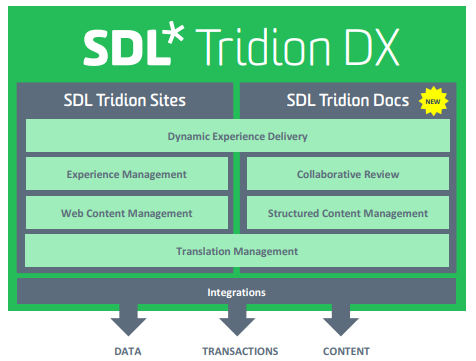
Recently SDL launched SDL Tridion DX suite, Sites 9 is part of it. Last version was Sdl Web 8.5.

There has been addition of new feature in the SDL Tridion DX suite.

Here are summary of few of the features of it.

Public Content API

It consisting of new GraphQL endpoints for the Content Service and the Session-enabled Content Service, based on the GraphQL API query language, and using the same RESTful endpoints as before for the Content Deployer.  GraphiQL IDE can be used to play with it.


Image editing in CM

Introduced  basic editing capabilities of the feature:

Crop
Resize
Flip
Rotate by 90

Integration of Tridion & DOCS

SDL Tridion Sites can be integrated with SDL Tridion Docs (13 SP2 onwards) to facilitate a "content mashup" --that is, putting content coming from both products together on the same webpage.

Page Region: Content template on CMS page can be grouped into Regions, its nice help for Content authors. but region name again confusing as there are already various kind of regions in DXA.

Tridion is back: It now called SDL Tridion Sites instead. community is very happy with it.

SAML 2.0 authentication :  Content manager and XPM  login is cloud ready now, and supports SAML. SiteMinder or IBM Tivoli are deprecated, but still works,  but  as the Core Service, WebDAV , Content Porter, Template Builder and the Visio Designer, still use LDAP-based authentication.

XSD Validation of CD config files: Earlier if you introduce any issue in XML file such as cd_storage, system would through weird errors and logs has to be scanned for checking issues.  but now these config files are validated against XSD on start of services.

Elastic Search in XO : Fredhopper has been replaced with Elastic Search.

CILs.net extension through DI: Another awesome and long pending change, Default implementations of logging and caching can be replaced with custom using DI.


November 19, 2018

Compatibility Chart of SDL Tridion Sites


Compatibility Chart 

Tridion 2011 SP1 Tridion 2013 Tridion 2013 SP1 HR1 SDL  8 SDL 8.5 SDL Tridion Sites 9
Microsoft Edge - - - - -
Internet Explorer 11 - - ✓ ✓ ✓  ✓
Internet Explorer 10 - ✓ ✓ ✓ ✓
Internet Explorer 9 ✓ ✓ ✓ - -
Internet Explorer 8 ✓ - - - -
Internet Explorer 7 ✓ - - - -
Internet Explorer 6 - - - - -
Mozilla Firefox ✓ ✓ ✓ ✓ ✓  ✓
Google Chrome ✓ ✓ ✓ ✓ ✓  ✓
Safari for Mac ✓ ✓ ✓ ✓ ✓
Safari 12 for Mac ✓
Operating System
Microsoft Windows Server 2016 (x64)  ✓
Microsoft Windows Server 2012 R2 with Update x64  Y
Microsoft Windows Server 2012 R2 x64 ✓  ✓  ✓
Microsoft Windows Server 2012 x64  ✓ ✓  ✓Dr
MS Windows 2008 R2 SP1 x64  ✓  ✓ ✓  ✓  ✓
Microsoft Windows Server 2008 R2 x64  ✓D
Microsoft Windows Server 2008 SP2 x86/x64  ✓D
Windows Server 2003 x86, x64
Windows 10 x86, x64
Windows 8.1 x86, x64  ✓  ✓
Windows 8 x86, x64  ✓  ✓  ✓  ✓Dr
Windows 7 Sp1 x86, x64  ✓  ✓  ✓  ✓  ✓
Database Server

AWS RDS-MSSQL 2017
✓
AWS RDS-MSSQL 2016 - ✓
AWS RDS-MSSQL 2012 ✓ ✓P
Microsoft Azure SQL database - - - ✓ Y
Microsoft SQL Server 2017 ✓ ✓
Microsoft SQL Server 2016 SP2 ✓
MS SQL 2016 SP1 - - - - ✓
MS SQL 2014 SP2 ✓P
MS SQL 2014 SP1 - - - ✓ -
MS SQL 2012 SP3  -  -  -  - ✓P
MS SQL 2012 SP2  -  - ✓ ✓  -
MS SQL 2012 SP1  - ✓ ✓dr  - -
MS SQL 2008 R2 SP3  -  -  ✓  -  -
MS SQL 2008 R2 SP2  ✓ ✓ ✓dr  -  -
MS SQL 2008 R2  ✓dr  - - - -
MS SQL 2008 SP3  - - - - -
MS SQL 2008 SP2  - - - - -
MS SQL 2008 SP1  - - - - -
Microsoft SQL Server 2005 SP4  ✓P  - - - -
Microsoft SQL Server 2005 SP3  ✓Dr  -  -  -  -
Oracle Server 12.2.0.1 ✓
Oracle Database 12c patch set 12.1.0.2  -  -  ✓  ✓  ✓
Oracle Database 12c patch set 12.1.0.1  -  -  ✓dr -  -
Oracle Database 11g Release 2 patch set 11.2.0.4  -  -  ✓  ✓  ✓  ✓
Oracle Database 11g Release 2 patch set 11.2.0.3  -  ✓  ✓dr  -  -
Oracle Database 11g Release 2 patch set 11.2.0.2  ✓  -  -  -  -
Oracle Database 11g Release 2 patch set 11.2.0.1  ✓dr  -  -  -  -
Oracle Database 10g Release 2 patch set 11.1.0.7  - - - - -
Oracle Database 10g Release 2 patch set 10.2.0.5  ✓ ✓  ✓dr  -  -
Oracle Database 10g Release 2 patch set 10.2.0.4  - - - - -

November 12, 2018

DXA 2.0 introduction and future

DXA 2.0 is change in terms of compatibility and existing model and releases.
here is list of changes and features in this greatest and latest release of Digital Experience Accelerator.


  • Trivident's DD4T and SDL DXA will merge to become a one product. it will allow to release it fast and compatible versions.
  • Product Backlog will be made public to community.
  • R2 - New Data Model 
  • Clean Data Model comparable to existing. 
  • Major changes in Caching, support of Donut caching.
  • Introduction to Model service, which runs at Delivery Side & DXA app consumes it.
  • Enhance performance using new tbbs and DXA resolver, As Expansion of linked components is now happens in Model Service
  • Improvements in Publishing Pipeline.
  • Extension points for CIL.net
  • Developer can change/extend implementation.
  •  Logging
  • oAuth provider.
  • ADF claim store provider etc

Architecture


Caching

  • Make it all distributed or place only certain cache regions in distributed cache
  • Provides output caching and view model caching
  • New output caching supports dynamic entities as well, Implement via  annotation of classes using     new properties:
            [DxaOutputCache]
            [DxaNoOutputCache]
  • You can cache fully built view and entity models
  • Mark models as dynamic to avoid them cached.
  • Support for Redis to support Distributed Cache.


Migration from existing DXA versions

  • - DXA 1.x -> DXA 1.8 ->  DXA 2.x [.NET]
  • - DXA 1.x -> DXA 1.8 ->  DD4T 2 ->  DXA 2.x [Java]

June 25, 2018

Caching in SDL Tridion Content Delivery System - Part 2

Configuring Cache


<logger name="com.tridion.cache" level="DEBUG">
<appender-ref ref="rollingCacheLog" />
 </logger>

Content Delivery caches its published content using its default implementation, which means that items are removed based on the "least-recently-used" policy (items that were least recently used are removed first) and using the dependency tracking feature (items are not removed if they depend on other items still in the cache). Only LRU policy is available.

Cache Invalidation Mechanism

- Cache Channel Service
- Apache MQ


Cache channel service has issues with Port allocation, CCS opens random ports sometime or required lots of ports to be opened for communication, so its least preferred way.

Another way is Apache MQ, its mostly used invalidation system, but install version as specified by SDL, because latest version does not work on it and cause lots of issues.


With DXA 2.0 SDL start offering Model service cache on the delivery side, which resolve the object and dependency, it also offer cache and its specified as follow.

Model Service Cache:


May 04, 2018

Caching in SDL Tridion Content Delivery System - Part 1

SDL Content delivery has many different components and, caching happens at multiple levels. I am trying to explain different level of caching here.

- Server Side Cache (Delivery System)
- Client Side Cache (.net/java app)


By default, caching of published content is not enabled. You need to enable it in the cd_storage.config


March 24, 2018

Sdl Tridion Sites Dev Summit 2018 Bengaluru

After rocking in Mumbai, New Delhi(twice), This year Dev Summit happen at Bengaluru. 55+ techies were present in the summit including Nuno, Alvin, Kurt, Venu from SDL.

Day was packed with brilliant sessions.


Theme of the dev summit was Introduction and knowledge sharing of to-be-launched, SDL Tridion DX which combines SDL Tridion Sites 9 and SDL Docs.
also DXA 2.0.

Everyone from SDL presented the sessions including.

- Nuno presented SDL Tridion Sites and DXA 2.0
- Rajesh Kumar shared thoughts on pre-sales demo.
- Kurt showed demo on Tridion Docs
- Sayantan showcased the connectors.
- Alvin on GDPR.

Content Bloom Folks also presented couple of session.
- Priyank showcased Powershell and Core Service connection and some commands.
- Pankaj on UDP and Upgrade Strategies
- Hemkant shows use of Containers.

I presented on various ways of Caching in SDL echo-system, including DXA 2.0

after parties were awesome. Shh....

February 15, 2018

Different types of Content migration

Website is the most important element of any business & digital strategy. In rapid changing web and web technologies it becomes necessary to redesign your website/web app for different requirements.
  • Not responsive
  • Content update to reflection on website takes time.
  • Content creation process is mess.
  • Integration with CRM, DAM, E commerce, Social media.
  • Launch & Translation for new market is cumbersome
  • Conversion is bad
  • Outdated technologies
  • SEO & ranking issues.
Content is king and design is queen, so both needs to be up to date for your business kingdom.
Information Architecture (IA) is very first step in the redesign of the website. Information architecture helps in organizing content so that users intuitively adjust to the website & find without extra effort. Information Architecture becomes blueprint for UX team and wire framing. Though wire framing is becoming out of fashion due to quick turnaround time for design. IA and UX are very important aspects of the redesign.

Content Migration

IA & UX also helps in driving whether existing content can be used or needs to be migrated. Because if existing content does not fit, then new content copies and authoring of same becomes part of redesign project. Due to change in IA and UX new images, device specific images will be required. Content as-is migration does not make sense.
But still there are section of website which require content migrations, blogs, articles any other content which does not get impacted due to above changes.
Content Migration can be manual or automated.
Manual Migration:
It involves a person or team of people doing the work of copying and pasting a site’s content from one system to another. If content to be migrated is not enormous and doesn’t have lots of Media than Manual migration is the one of the choice. But any change in design will cause again going through all the content and update in all the pages, which becomes very cumbersome and error-prone.
Automated Migration
This method requires developers to write script/code to fetch the content from one system and push the content into target system using Target's system's API. (e.g. in SDL Tridion, Core Service is used). Depending on complexity of target system some specialization is always required to write the migration scripts and validation.
Automation migration also falls into two types
  • Source CMS to Target System directly.
  • Intermediate system to Target System.
Hybrid Migration
There are situations when Target system is not yet ready for content authors and authors can't wait till system gets ready, as content size is huge and timelines may get affected.
So an intermediate system is taken where author enters the content instead of Word processing software's. Later on when target system is ready, content can be imported using automation scripts, so a parallel track starts writing scripts to automate the content ingestion from intermediate system to target system.

February 14, 2018

Publish Settings in DXA explained

DXA has few system pages like Html-design, _navigation and “Publish Settings”, out of these Publish Settings is the one which boots an DXA application and considered as the very important system page.
Publish setting provides intelligence to the MVC application to get it work faster and isolated from CMS.
How does it choose what to publish?
So DXA provides a schema called Module Configuration. Whenever a module is created, a component of this schema is created you define the module name, version and related dependencies of it.

Whenever Publish-settings is published. It searches for the all components created with this schema
& generate files which store as binaries in the Broker DB. Above picture is of Core component (Module-Configuration schema). If you see it has listed configuration and Resource dependencies of this module.
Files Generated –  (each files starts with its module name)
/System/config
-          Core.json  - Contains all the configuration values(combined)  from attached components above
-          Core.schemas.json – contains name and id of all the schema of this module
-          Core.taxonomies.json – contain all taxonomies of the system.
There is another file _all.json in this directory which actually list all above files and few other environment settings.
/System/Resources
-          Core.json – a combined file of the entire resource component attached in module configuration.
/System/Mappings
We can say it is master data of schemas & templates, this is not module dependent files but global files.
-          Schemas.json - it contains all the schemas’ definitions from the CMS.
-          Regions.json - it has details of all the regions and details of component template where it’s used, along with linked schema of CT.
-          Includes.json – it contains all the Page Template Ids and associated includes in that PT.
So lots of information required/used by DXA for various purposes.
It needs schemas. Json to map field values to the respective entity, Semantics and XPM in MVC application. So whenever there is change in schema you have to publish “Publish settings” page to reflect the change in application.
Some Tips:
Any change in schema CT’s Region and PT’s includes require users to publish this page. Otherwise you will spend hours to figure out where the heck are my changes.
When DXA boots it loads _all.json of config and resources to read all the respective files and download all these under BinaryData folder of your application’ root directory.


January 22, 2018

Semantic markup using Schema.org in DXA

What is Semantic SEO:  Semantic SEO is giving meaning to your  data embedded in the html Tags using some metadata. and which would be utilized by the search engine to index your page in better way.

Why do i care: Semantic SEO is hot topic these days because Google and other Search engine have updated their algorithm to consider and give little higher weight to pages having  semantic markups. It seems inevitable that including semantic mark-up tags in your html will become more important,  check this: Schema mark-up rank higher in SERP’s.

What is Schema.org
Schema.org  provides vocabulary to give semantics to your html tags , which is supported by  Google & Bing. You can find out schema from schema.org for your particular entity and tag the content with that to give it a meaning.
schema.org standards allows specified entities such as products, places or people to be identified in your HTML with different attributes.

Example: Markup with semantic attributes

<div prefix="s: http://schema.org" typeof="s:Movie">
<h1  property="s:name">Avatar</h1>
  <span  property="s:genre">Science fiction</span>
</div>

On inspecting above tags, you will find out above details have been given meaning by adding those attributes (bold). so without this any search engine can't distinguish between what is above information exactly. Now Search engine knows its A movie which has name Avatar, and its a Sci fiction.

Without semantics Google may have index it as book, some mythological character etc. but now its has specific meaning and that's the purpose of Semantics SEO and Schema.org.

Formats: Schema.org just provided the vocabulary or schema to give meaning to your information, but hows this vocabulary is attached to content is , where format comes to the picture.
following are the main formats using which we can tag our content.


DXA and Semantic SEO : 
DXA makes life very easy for us to add those ugly semantics markups into your html tags. Its very good feature which comes OOTB in the DXA all version.

DXA default Implementation: DXA comes with RDFa Lite implementation.  RDFa Lite consists of five simple attributes; vocab, typeof, property, resource, and prefix. so its lite version of RDFa which i mentioned in the list above.
if you want to use any of other format in your code, then you have to implement it.

[SemanticEntity(Vocab = "http://schema.org", EntityName = "Movie", Prefix = "s", Public = true)]
    public class Movie: EntityBase
    {
        [SemanticProperty("s:name")]
        public string Name { get; set; }
         [SemanticProperty("s:genre")]
        public string Genre { get; set; }
    }

SemanticEntity -:  This attribute actually defines which Vocabulary you are going to use
EntityName: Entity name from specified Vocab. Name is one of schema in Schema.org
Prefix: kind of namespace. so if you define multiple formats , Vocab on the it. it would help to differentiate.
Public=true/false:  Semantic attributes will only be applied to markup if Public=true, otherwise it will be ignored.
SemanticProperty: Name of  Entity properties has to match with the name defined in schema.org/Movie only then it will add meaning and will be used by Google to index.

<div @Markup.Entity(Model)>
  <h1 @Markup.Property(Model, "Name")>@Model.Name</h1>
   <span @Markup.Property(Model, "Genre")>@Model.Genre</span>
</div>

so when this is executed, it will give output  as shown above.

Semantics markup Validation using Google structure testing tool; developers.google.com/structured-data/testing-tool/


December 20, 2017

Tutorial for Tridion Powershell commands

In my last blog post, i demonstrated the setup of Powershell for beginners. Now i will discuss more commands of Tridion Powershell.

List of commands: following Power shell command will return all the commands available in Tridion Powershell module.

PS C:\Windows\system32> Get-Command -Module Tridion-CoreService

  • Clear-TridionCoreServiceSettings
  • Close-TridionCoreServiceClient  
  • Convert-TridionApplicationData  
  • Get-TridionUser - there is also Get-TridionUsers which is not listed by get-command
  • Disable-TridionUser             
  • Enable-TridionUser              
  • Get-TridionApplicationData      
  • Get-TridionCoreServiceClient    
  • Get-TridionCoreServiceSettings  
  • Get-TridionGroup                
  • Get-TridionGroups               
  • Get-TridionItem                 
  • Get-TridionPublications         
  • Get-TridionPublicationTarget    
  • Get-TridionPublicationTargets   
  • Get-TridionPublishTransaction                
  • New-TridionGroup                
  • New-TridionItem                 
  • New-TridionPublication          
  • New-TridionUser                 
  • Publish-TridionItem      
Lets try few of the commands to unleash power of Powershell 

Get-TridionPublications:
Above command it will list all the publication details with lots of additional information.  You can also filter the the number of fields to show and in nice format. below example show just Title, Id and PublicationType.


User Based Operations:


To get all users those are not currently active. PS module make is very easy to fetch those details and take action if required. Firstly all the Users are fetched then filtered on rows, then on columns respectively.

PS C:\Windows\system32> Get-TridionUsers | where  {$_.IsEnabled -eq $false} | select Title, IsEnabled, Description

Title                                                                 IsEnabled Description
-----                                                                 --------- -----------
SDLDEVCMS\rkum                                                      False Raj Kumar

Enabling all the disabled users at once:

Get-TridionUsers | where  {$_.IsEnabled -eq $false} | Enable-TridionUser

otherwise if you just use Enable-TridionUser command, you have to pass one by one to enable/Disable the users


Publish Transactions Operations:
To get the status of transactions, you manipulate the results on various parameters

Following command with list out all the failed transactions in publishing queue. 

Get-TridionPublishTransaction | where {$_.State -eq "Failed"} | select Title, Id, State

List out tranactions grouped by State

PS C:\Windows\system32> Get-TridionPublishTransaction | Group-object State


December 19, 2017

Load balancing DXA and CD servers in Web 8

With new micro-services architecture its very efficient to distribution of workloads of different servers. Dxa servers aka Presentation servers can be load balanced separately.


Features of above architecture:
  • Works best in fail-over scenarios. if any service is down other available can take the load
  • Presentation machines can be added or removed on the go without worrying about setting up the CD servers.
  • Its cost efficient scenario.

I tested above above on Microsoft Azure, presentation servers were load balanced on Application gateway.
and CD servers were load balanced using Azure Load balanced.

How does it work?

Settings:
  • DXA web.config is configured with IP address of Load-balancer for Discovery service.  
  • Required capabilities listed in Discovery service has URLs of Load balancer. 
  • Discovery DB is shared among all the discovery servers.
  • Load Balancer is aware of available nodes of services.
when request comes to Application gateway, AG get it processed from one of the available DXA server. if Dxa app is already loaded and request pages is already processed and cached it can be processed completly on DXA machine itself.

otherwise Discovery Service URL is hit which goes to internal load balancer. Load balancer get this executed from one of CD server. AS discovery had configured address of Load-balancer for Content Service, request once again go to LB. it then redirects it to available Content service node. so a request is completed.

With use of Akamai and other caching strategies e.g page caching or donut caching and other tridion caching techniques CD servers might get reduced load after first hit and boot time. DXA servers are easy to Auto-scale.

December 12, 2017

Introduction to Tridion Powershell

What is PowerShell:
Windows PowerShell is a Windows command-line shell designed especially for system administrators. Windows PowerShell includes an interactive prompt and a scripting environment that can be used independently or in combination.
Windows PowerShell is built on top of the .NET Framework common language runtime (CLR) and the .NET Framework, and accepts and returns .NET Framework objects. Its also extensible.

Introduction to Tridion Powershell:


Peter Kjaer has developed Tridion Powershell Module  which contains cmdlets that allow you to talk to the Tridion Content Manager using the Core Service. This is very powerful and fast way to access Tridion system without opening CME. It Currently supported Tridion versions: 2011 SP1, 2013 GA, 2013 SP1 and Web 8.

Setting up Tridion Powershell:

Open Powershell windows as administrator. 
iwr "https://raw.githubusercontent.com/pkjaer/tridion-powershell-modules/master/CoreService/Installation/Install.ps1" | iex


Tridion Powershell module will be installed with above success message.

Verify Settings:
Run a command to test the environment. if there are issues in settings you may can following error


Get-TridionCoreServiceSettings will give you current settings its using. 
but ensure these settings are as per your environment

In my case, Coreservice was running at another port, so commands were failing. so you might have to update the setting as per need. 

Update Settings:

PS C:\Windows\system32> help set-TridionCoreServiceSettings

NAME
    Set-TridionCoreServiceSettings

SYNOPSIS
    Changes the settings used to connect to the Core Service.
when 
SYNTAX
    Set-TridionCoreServiceSettings [[-HostName] <String>] [[-Version] <String>] [[-Credential] <PSCredential>]
    [[-ConnectionType] <String>] [[-ConnectionSendTimeout] <String>] [-Persist] [<CommonParameters>]

Following command changes the hostName on my environment. You can update as per your enviornnment.

Set-TridionCoreServiceSettings -HostName localhost:91

after the setting are done, retry following command

Get-TridionPublications to get list of publications in the system.

December 08, 2017

Whats up SDL

SDL Web 8.5 was last major release by Sdl around start of this year. This year has been very challenging in IT for everyone. SDL ranked as Challenger in Gartner's magic quadrant. Sdl sold its  non-core products: “Social Intelligence, Campaigns, and SDL Fredhopper to focus on core.

SDL is working hard and there are number of changes happening under the hood, and impressive Roadmap.

Lets start with Major change:


SDL Tridion DX


SDL rebrands SDL Web to SDL Tridion Sites and SDL Knowledge Center to SDL Tridion Docs, and "Tridion" is back and i am so happy like any other community member.


SDL Tridion DX combines SDL Tridion Sites (WCM) and  DITA-based Structured Content Management (SDL Tridion Docs) and translation technology supported by artificial intelligence (AI)

Check Press release for more information on above

Graphene UI: is awesome, Check this Future UX & UI blogs to check the impressive work that is happening. I am impressed!!

GraphQL services: GraphQL will be replacing OData services.

Integration & connectors: As per connector strategy SDL is developing connectors for lots of products, tools and services.
e.g Sales force marketing cloud, Marketo, Microsoft dynamics, Experience Regions, SDL ETS on AWS and many more eg. Image Editing with in CMS

Salesforce Community Cloud integration: this is just released check out.(updated after release)

DXA Form Builder Modules:


Form builder is always requested by clients but SDL gets X in the capability matrix, , but i just to get know Niclas Cedermalm from SDL just released form builder DXA module with name "Alpaca Forms", Also its open source. I am writing it here for community awareness. i will write a separate blog on it. It currently supports DXA 1.7 more supporting version later.

HTML5 forms module is based on Twitter Bootstrap and Alpaca.JS which uses JSON and inturn used to generate form on Delivery side.

Forms are CMS component like any other component and can be added to pages. End Points can be configured to APIs. Customization is also possible as you can write your custom code to pass data to required ice. The Forms DXA module also comes with a built-in controller that can send form data to different endpoint such as DB, e-mail and CRM.

Personalization:
SDL is redesigning the whole experience for personalization and it looks very promising.

Prescriptive Personalization:  this is based on predefined  rules by author.
Adaptive Personalization: Machine language based personalization. 

November 30, 2017

Content migration from Gather Content to SDL Tridion

Content Migration Automation in SDL requires use of custom code written using Sdl Core services. Core services are set of APIs which helps in ingestion of data in to CMS system. But i have found people writing repetitive code to ingest data into CM.

Its not as complex as Elon Musk reusable Rockets. I mean its not rocket Science.

So write code to interact with SDL once, and use that to deploy the payload into required system.

Here is the process:


Gather Content:

Instead of getting content into excel or world, having content in Gather Content gives lots of advantages.

Gather content tool provides very simple and intuitive interface to enter the content and images. it allow collaboration, simple workflow, activity trails and CMS like interface. Collecting data from various users becomes very simple.

GC comes with direct import feature for various CMS, but Tridion is not yet supported.

Content Export:

After getting content into GC, its must be exported, there are multiple ways you can export the content,
- API
- Export to CSV

Adapter:

Adapter is system which converts above exported content into required format, this would be typically Schema format of  SDL component. This is little tricky but not that complex, Little  complexity is involved when dealing with linked component is required. Output of adapter is set of Xml files and config files which provides other required information for component to ingest.

Migration Tool:

Your organization should have this tool which accepts Content as XML and config files and ingest the content into system. As this tool is already tested and proven, so ingestion should be smooth if your adapter has created files well formatted.

In this way you can speed up the content migration part

October 30, 2017

SDL MVP retreat 2017

MVPs are few chosen Tridion professional who are selected based on yearly contribution to SDL community. SDL pampers those professional with work, sea food, music and unlimited Daaru in retreat. SDL retreat provides chance to visit Portugal again if you miss any place during last years.

SDL retreat is one of the most awaited event of the year for MVPs. It motivates for next year.

"This is always 5 days event, SDL treats you like Damad except few Fatwas:

  • From the moment you arrive to your departure airport until you fly back home, nearly all expenses are covered. If you decide to get drunk in a bar at the airport, I expect that you earn enough to pay for it yourself and not present me with an expense receipt for it, or I’ll remember next year.
  •  If you lose your flight due to above mentioned state of drunkenness, I also expect you to be man enough to realize it’s your damn problem to fix.

Few tips from one of the Permanent and Veteran Member

  1. Keep on the right side of Carla
  2. Don't try to out-drink Nuno 
  3. Don't expect to go home thinner
  4. If you at all musical (even slightly), we will expect you to enztertain us, and yourself. Even long-buried musical talents have been unearthed at the retreat. But there are no rules. And of course, bring your instrument(s).
  5. Expect the unexpected from your fellow-MVPs and yourself
My Biggest worry:

"What kind of Veggy food, No eggs" will be served to me in. *T*: Veggy food in Portugal?

Few Testimonials 

Carla:
"Well I'm actually thinking of doing all vegetarian meals FOR EVERYBODY and alcohol free retreats from now on"
Curlette:
"Great to have you back and finally someone more picky than me with food :) Already making me look better Haha ;)"
But to my surprise food was really good this time with few exceptions. My biggest helper was Garlic butter their which provided taste to food.


Day 1:
People gathers at Airport to meet and greet, then drivers drove to the Hotel Pousada de Ourem in beautiful city of Ourem. People drinks, eats and sleep to get early for the big day.

Day 2:

MVPs gathers at conference room for connect on upcoming changes in SDL product and road-map. Nuno and other Sdl teams showcase ongoing work. Some goodies to collect on EOD.

Day 3 & 4

Time to code and shocase next day. I teamed up with The Nuno and Sayantan to develop "Poor Man's AWS Cloudwatch Monitor" We successfully created & scheduled it on  Windows Scheduler to send queue status every 2-3 minutes to cloud watch. Night is full of fun, drinks and special musical performances by Quirijn, Raimond on Piano, Guitar..  give them any Instrument, these guys are exceptionally good. Rick and Johnathan also surprised with their Piano and singing skills respectively. Dominic also tried something with his mouth instruments before sleeping. 

also we saw some nazare @  Nazaré

Day 5

Time to say Good Bye & promises to meet again.

October 21, 2017

Publishing queue status on AWS Cloud-watch

In this years MVP retreat we did small Proof of concept to show the Publishing queue status on AWS cloud-watch in nice format. There are various ways to accomplish it.

- Using CoreService API to access the Queue.
- Directly querying the DB (not very recommended)
- PowerShell to read the queue (Yes its possible)

We choose last option as some Tridion Powershell Module created by SDL MVP Pkjaer makes it very easy.

Steps:

- Install Tridion Powershell module, details in above link.
- Install AWS Powershell module(s) on machine to work.
- Here is code snippet which do following

  • Import AWS Powershell 
  • Create Cloudwatch matrices based on two states "Waiting for Publish" and Waiting for Deployment"
  • fill the matrices with count of above two states
  • Write the data to cloudwatch


 Import-Module "C:\Program Files (x86)\AWS Tools\PowerShell\AWSPowerShell\AWSPowerShell.psd1"  
 $dat = New-Object Amazon.CloudWatch.Model.MetricDatum  
 $dat.Timestamp = (Get-Date).ToUniversalTime()  
 $dat.MetricName = "Waiting For Publish"  
 $dat.Unit = "Count"  
 $dat.Value = (Get-TridionPublishTransaction | Where-Object {$_.State -eq "WaitingForPublish"}).Count  
 $dat1 = New-Object Amazon.CloudWatch.Model.MetricDatum  
 $dat1.Timestamp = (Get-Date).ToUniversalTime()  
 $dat1.MetricName = "Waiting For Deployment"  
 $dat1.Unit = "Count"  
 $dat1.Value = (Get-TridionPublishTransaction | Where-Object {$_.State -eq "WaitingForDeployment"}).Count  
 set-AWSCredentials -AccessKey -SecretKey FT1nwN74NHkGtlJ -StoreAs "MVP17"  
 Set-AWSCredentials -ProfileName "MVP17"  
 Write-CWMetricData -Namespace "Usage Metrics" -MetricData $dat  
 Write-CWMetricData -Namespace "Usage Metrics" -MetricData $dat1  

Auto-scaling:

One of the purpose to push the queue data to AWS Cloudwatch is to configure the auto-scaling of instances.

if there are lots of items in queue, auto-scaling of publishing system can be configured on AWS infrastructure.


September 30, 2017

Migrate Images in Media Manager automation

Consider the use-case of uploading 7500 images manually and linking each image with component in SDL  Tridion. Its very tedious tasks to do and if any change in images and need to redo 2-3 times. you need hell of a time and dedication.

So Best approach is to Automate set of tasks so that it can be imported into Media Manager and Linking can also happen side by side.

So need following set of services to accomplish this task:

  1. SDL Tridion
  2. Media Manager Cloud instance
  3. STS Service
  4. SDL Media manager Client
  5. ECL Service Client
Part 1

Connecting to Media manager

STS - Security token service (STS) is a cross-platform open standard core component of the OASIS group's WS-Trust web services single sign-on specs.

STS is used to authenticate between Migration Tool and SDL media manager. setting up it required configuring public key of the  Media manager. It was the hardest part for this whole stuff.

- Generate proxy from the Media Manager Service
-  STS service should be in the running state.
- Migration tool will connect to MM using Federated Security with STS service providing the encoded MM's public certificate.
- Once connection is established the upload process triggers.

There would be two bindings in app.config  one for connecting to mediaManager another to connect to STS service running on Url like following : http://localhost:89/IWSTrust13

Note: STS service is not provide OOTB by SDL. You have to code is based on STS standard or talk to SDL if they have ready to use such service which can be leverages.

Part 2
This section is involved in ingesting assets into DAM.

Following are code snippet for digital assets migration/ingestion. code. first section create a program id and upload image

second code snipped create a distribution associated with program id.

 public string UploadFile(long folderId, long assetTypeId, long[] tags, string keywords, string fullPathToFileToUpload)  
     {  
       MediaManager2011Client mediaManagerService = null;  
       try  
       {  
         Logger.Info("Uploading Image");  
         UploadInfoData data = new UploadInfoData();  
         data.DistributionCreation=DistributionCreationOptions.OneDistributionPerItem;  
         data.IsIncludedInGalleries = true;  
         data.MakeAvailableForDownload = true;  
         data.MakeAvailableForWebPublishing = true;  
         data.ProgramCreation = ProgramCreationOptions.OneProgramPerItem;  
         mediaManagerService = new MediaManager2011Client("FederationEndpointHttps");  
         string uploadUrl = mediaManagerService.GetUploadUrl(folderId, assetTypeId, tags, keywords, data);  
         WebClient webClient = new WebClient();  
         var response= webClient.UploadFile(uploadUrl, fullPathToFileToUpload);  
         WebHeaderCollection headers = webClient.ResponseHeaders;  
         string assetIdAsString = headers["AssetId"];  
         string programIdAsString = headers["ProgramId"];  
         Logger.Debug(string.Format("Asset Id:{0} & ProgramId:{1} For Uploaded Image", assetIdAsString, programIdAsString));  
         return programIdAsString;  
       }  
       catch (Exception ex)  
       {  
         Logger.Error(string.Format("Exception caught while uploading image-{0}", ex.Message));  
         return null;  
       }  
       finally  
       {  
         if (mediaManagerService != null)  
         {  
           if (mediaManagerService.State == System.ServiceModel.CommunicationState.Faulted)  
           {  
             mediaManagerService.Abort();  
           }  
           else  
           {  
             mediaManagerService.Close();  
           }  
         }  
       }  
}

  public ItemData CreateNewDistributionData(long programId,long folderId,string distributionName, long outletId, IMediaManager2011 client)  
     {  
       var distributionData = new DistributionData();  
       distributionData.Name = distributionName;  
       distributionData.OutletId = outletId;  
       distributionData.OutletType = OutletClassifier.Image;  
       distributionData.ProgramIds = new[] { programId };  
       distributionData.IsLive = true;  
       distributionData.FolderId = folderId;  
       return client.AddItem(distributionData);  
     }  

Part 3
after images are ingested into Media Manager DAM, those needs to be linked to required components in the Tridion. so for External Content Library has to be used. Installation and configuration of ECL are very well documented on SDL Docs.

ECL Service client - Generating ECL stub is quite a task, it involves getting Media manager id and generate a stub in the CMS which actually create a component in CMS with Tcm-id. 

Stub Uri has following format: "ecl:{publicationId}-mm-{dist-Id}-dist-file"
ECL client is used to create ECL stubs in CMS. Check Detailed Article